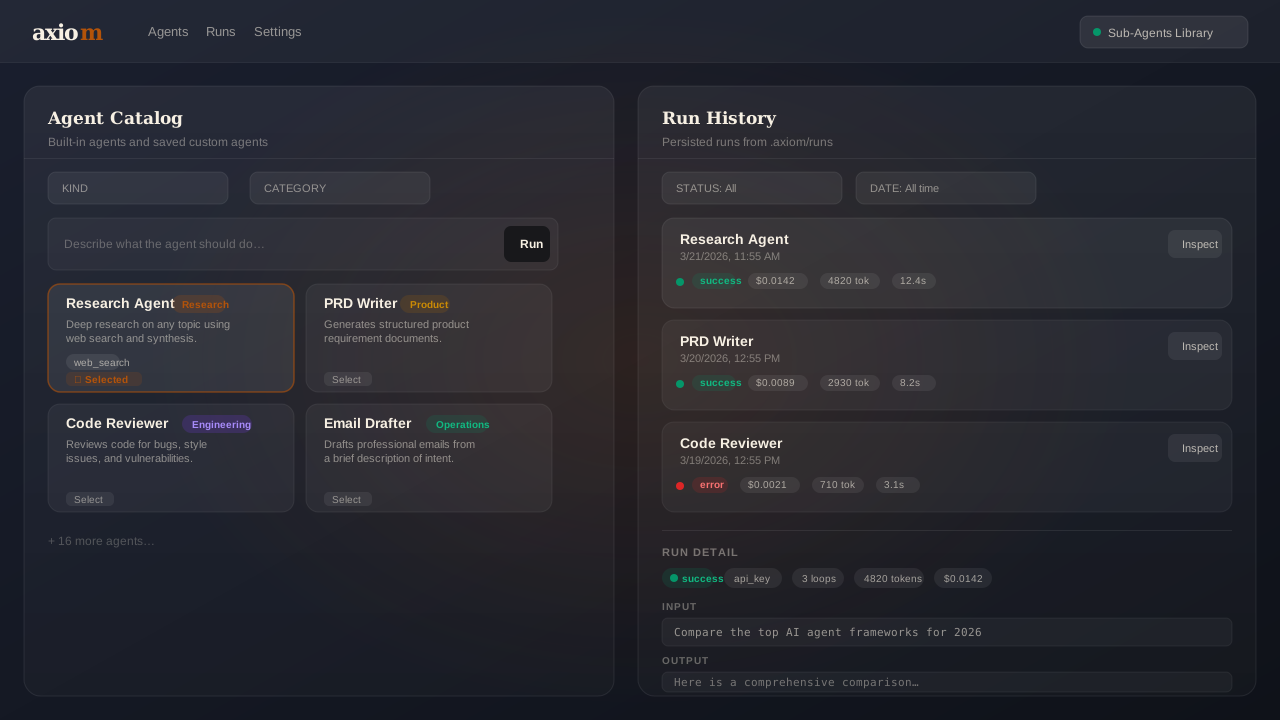
The axiom dashboard is a local web app that lives entirely on your machine. Browse agents, trigger runs, and inspect every result — all from your browser.
Two panels. No noise. Agent catalog on the left, run history on the right.
Every built-in agent and any custom agents you've created in .axiom/agents/ — filterable by kind and category. Select one, type your input, hit Run.
Every persisted run is listed with timestamp, agent name, status, cost, token count, and duration. Filter by success/error or date range.
Click any run to see the full input, output, auth mode, loop count, and every tool call made during execution — displayed as formatted JSON.
See the exact USD cost for every run so you're never surprised by your Anthropic bill. Token usage is broken down per run.
No cloud. No account. No telemetry. Everything is read from and written to your local .axiom/ directory. The server binds to 127.0.0.1 only.
One command and it opens. No Docker, no database, no environment config beyond your Anthropic key. Works on Mac, Linux, and Windows.
If you haven't already, install the global CLI.
$ npm i -g @axiomcm/cli
Export your Anthropic API key in your terminal.
$ export ANTHROPIC_API_KEY=sk-ant-...
Run this anywhere. It opens in your browser instantly.
$ axiom dashboard